
Text Message Opt-In
How truck drivers opt in to CargoConnect Driver Appointment Texts
Where drivers opt in
Drivers opt in on the CargoConnect driver check-in page, which a warehouse shares with drivers arriving for an appointment. The opt-in appears after the driver enters the order number of a load scheduled that day, on the step where they enter their name and mobile number. Because it only appears for a real appointment, the screenshot below shows it.
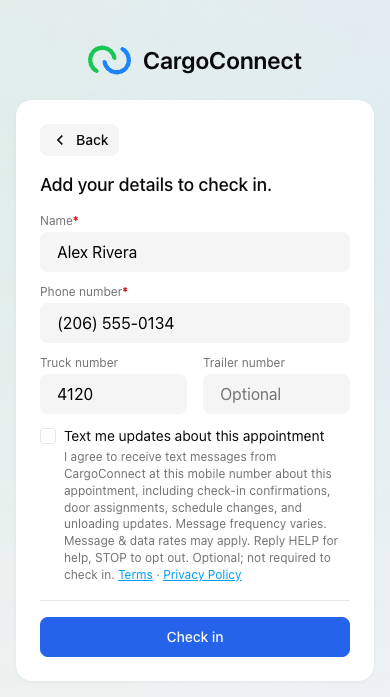
The opt-in wording
The box is unchecked by default. Its label reads “Text me updates about this appointment”, with this text directly under it:
“I agree to receive text messages from CargoConnect at this mobile number about this appointment, including check-in confirmations, door assignments, schedule changes, and unloading updates. Message frequency varies. Message & data rates may apply. Reply HELP for help, STOP to opt out. Optional; not required to check in.”
It is followed by links to our Terms of Use and Privacy Policy.
How it works
- Opting in is optional. A driver can check in without checking the box, and no text messages are sent to a number unless the box was checked.
- For each opt-in we record the date and time, the driver's name and mobile number, the appointment, and the exact consent wording shown.
- Messages are only about the driver's appointment: check-in confirmations, door assignments, schedule changes, and unloading updates. We do not send marketing or promotional messages.
- Drivers can reply STOP to opt out, START to opt back in, and HELP for help. Message frequency varies. Message and data rates may apply.
- Mobile numbers and opt-in data are not shared with third parties or affiliates for marketing or promotional purposes.
Contact
Cargo Connections Corporation, 2731 SE 4th St, Renton, Washington 98056
Questions about our text messages: [email protected]